
Computer, phone & tablet in sync – end-to-end encrypted
The logbook for everything that drives, tows and works.
Car, tractor, motorcycle, trailer or excavator: MaschinenNotes keeps track of fill-ups, maintenance, costs and deadlines for every vehicle – on your computer, phone and tablet, always in sync. Pair your phone in seconds with a QR code. Encrypted, no account needed.
Try every feature free for 14 days. Then buy once – no subscription. Sync with your phone and tablet is included in every license.


Download
Try it on Windows or Mac: every feature for 14 days, no sign-up. On Android and iOS, MaschinenNotes will be free – no ads, no in-app purchases; with your license’s sync code, the app syncs with your computer.
- Windows 64-bit Windows 10 and 11 · recommended Coming soon
- Windows 32-bit for older 32-bit systems Coming soon
- macOS (.dmg) drag the app to Applications · Apple silicon and Intel Coming soon
- macOS (.pkg) installer package · Apple silicon and Intel Coming soon
- AndroidComing soon, free
- iPhone & iPadComing soon, free
Why MaschinenNotes
Every device up to date
Log a fill-up on your phone, analyze it on your computer: computer, phone and tablet sync as equals – even phone to phone, without your computer running. End-to-end encrypted, photos and receipts included.
All your vehicles in one place
From the family car to the combine harvester – tracked by mileage or engine hours, whichever the machine counts.
Know your real costs
What does a kilometer cost, what does an engine hour cost? Month by month, split into energy, maintenance and fixed costs.
Never miss a deadline
Inspections, service, tire changes, insurance: MaschinenNotes reminds you in time – by date, distance or hours.
Your data is yours
AES-256 encrypted on every device and end-to-end encrypted when syncing – even the storage provider only sees ciphertext. No account, no tracking.
Buy once, no subscription
Your license never expires. Updates and the RuppiLab Cloud are included for 12 months; after that your version simply keeps working.
Included in every license
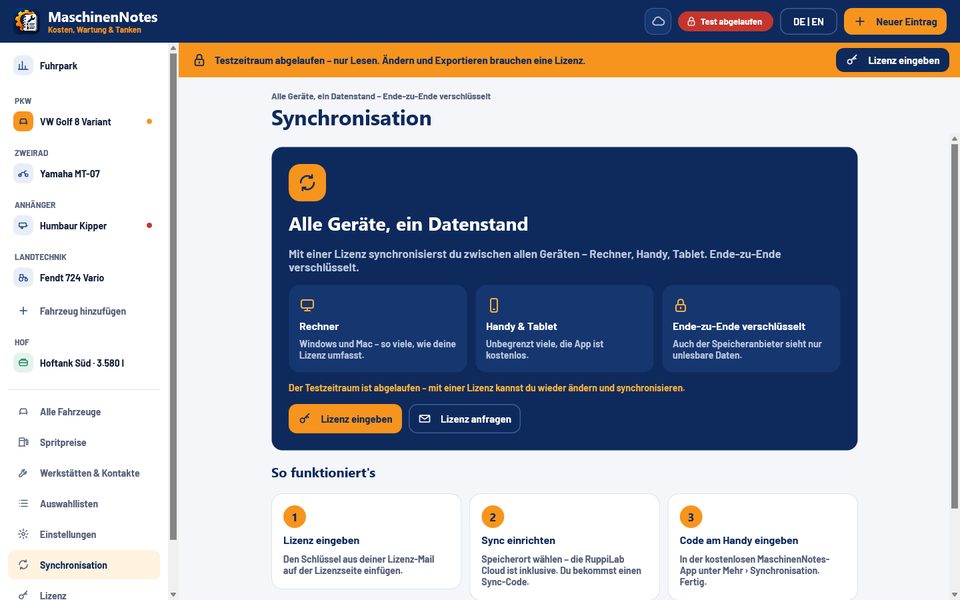
Sync: the same data on your computer, phone and tablet
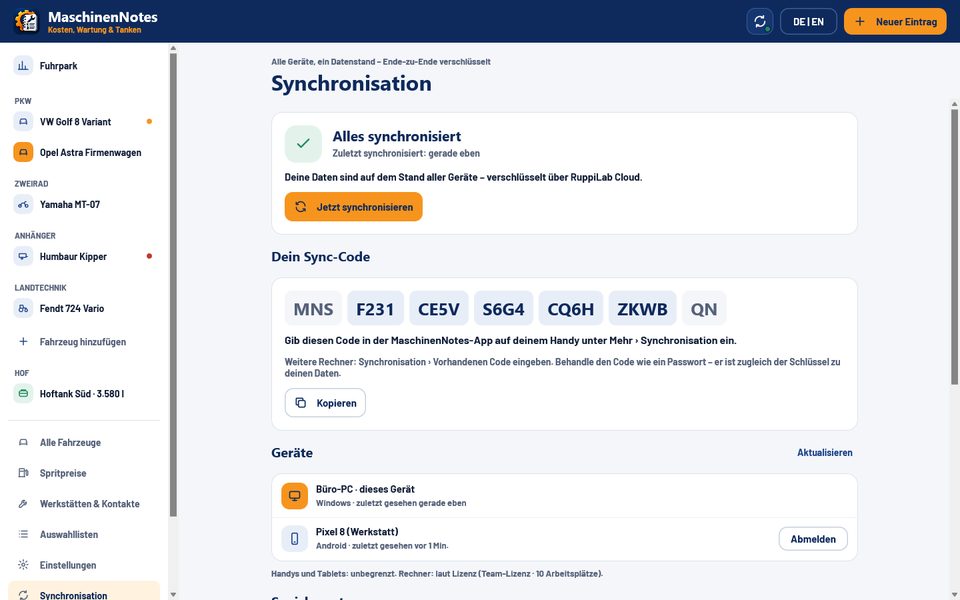
Analyze on your computer, log the fill-up on your phone, check things on the tablet in the barn or on site – every device is up to date. All devices are equal: even two phones sync directly through the cloud, your computer doesn’t need to be running. End-to-end encrypted, photos and receipts included.
How it works
Buy a license
You get the license key by email and use it to unlock MaschinenNotes on your computer.
QR code on your computer
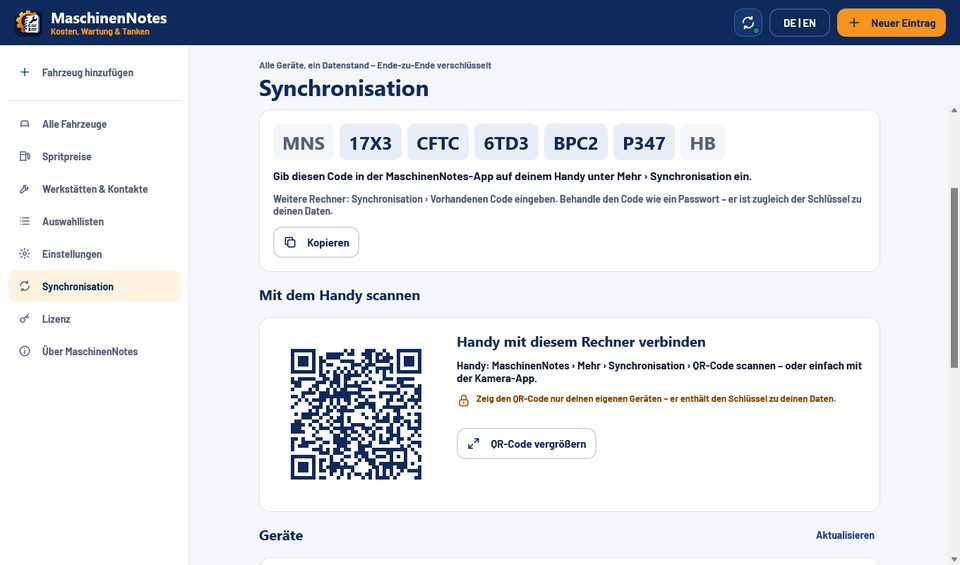
Once unlocked, set up sync. The desktop app shows your personal sync code – plus a QR code.
Scan it with your phone
In the free app for Android or iOS, tap “Scan QR code” and take a photo of the code on screen – or simply scan it with your regular camera app: MaschinenNotes opens with the code filled in, then tap “Connect”. Typing the code works too, as it does on another licensed computer.
Your choice of storage
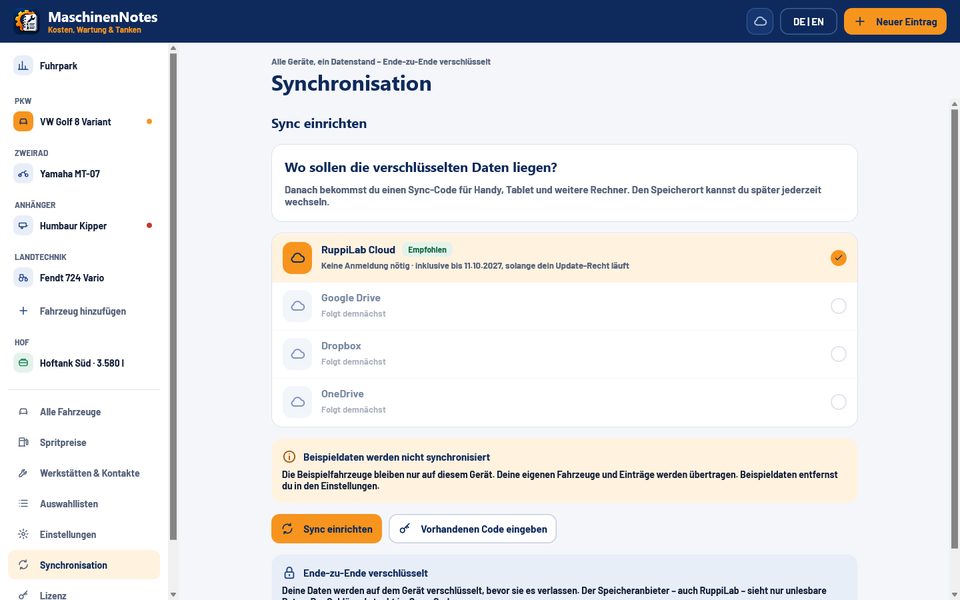
RuppiLab Cloud with no sign-up – included while your update rights run. Or your own Google Drive, Dropbox or OneDrive (coming soon).
End-to-end encrypted
Data is encrypted on the device with your sync code. The storage provider – RuppiLab included – only sees encrypted data.
All devices are equal
No device is the boss: phone and phone sync directly through the cloud, even when your computer is off. Unlimited phones and tablets, computers per license.
Work at the same time
Changes are merged record by record. Two people, two devices – no conflict dialog.
Photos & receipts included
Vehicle photos and receipts attached to entries are synced too.
Set up with a desktop license
You set up sync once on a computer with a purchased license – there is no sync code during the 14-day trial. The phone app works fully without a code, just without sync.


What MaschinenNotes does
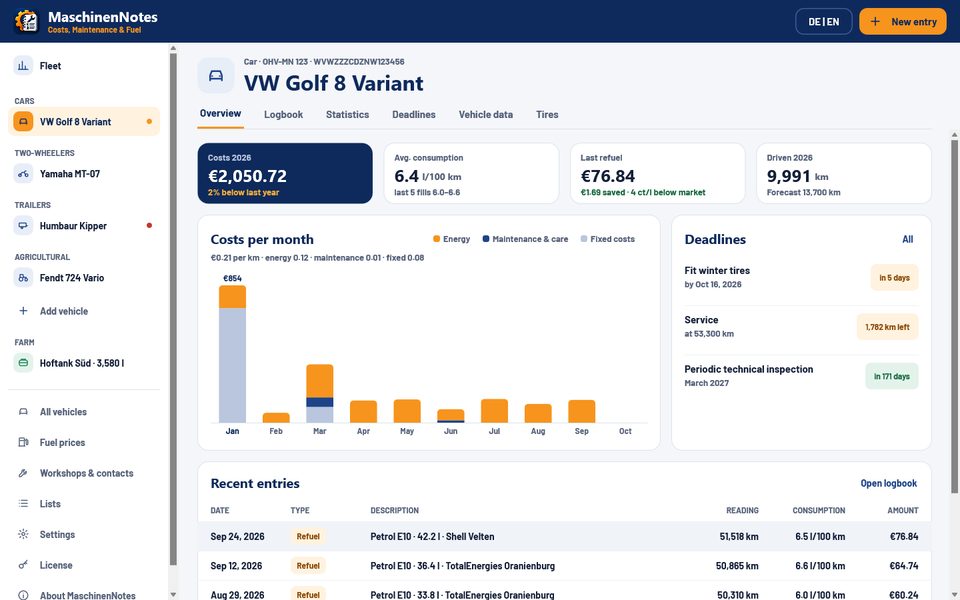
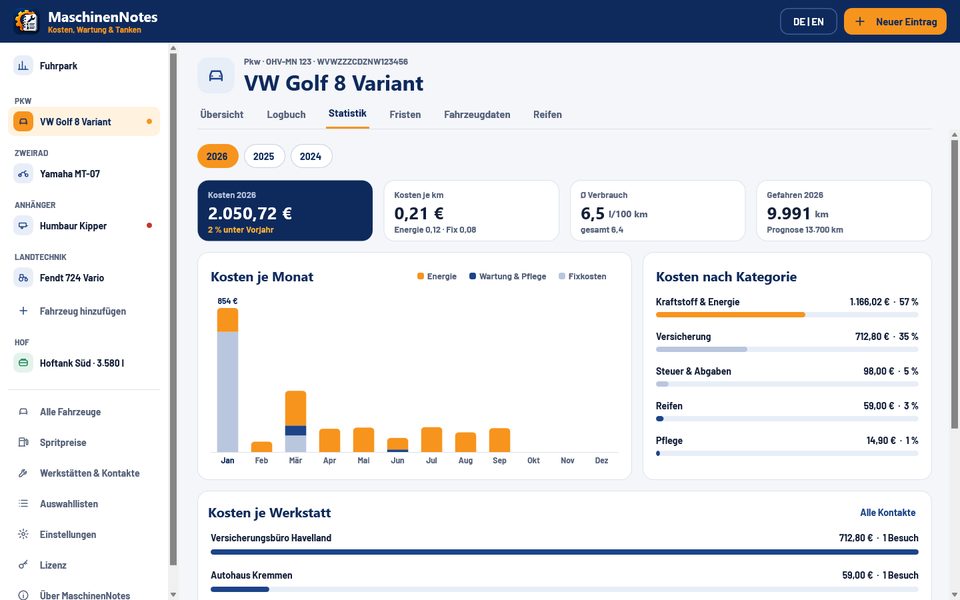
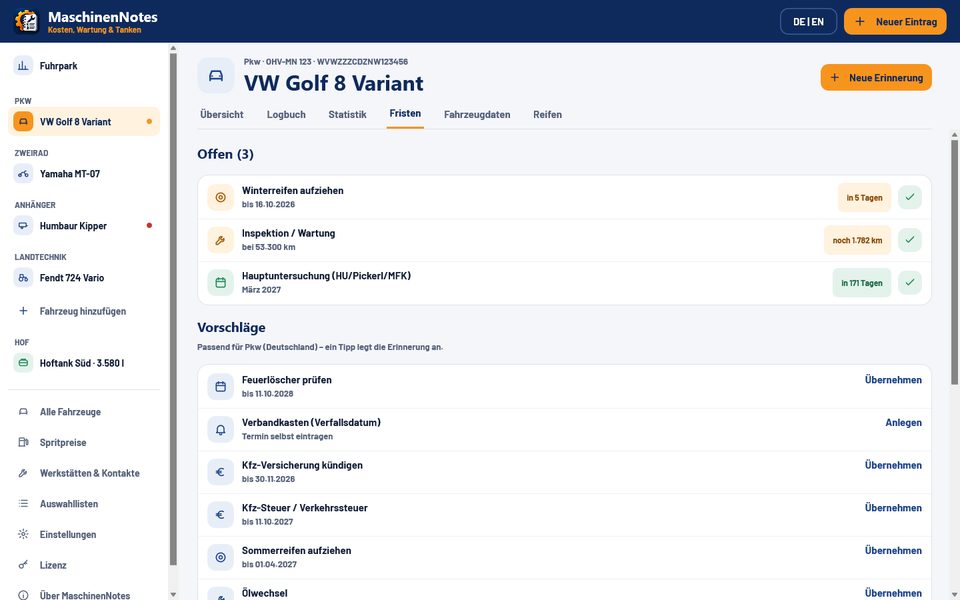
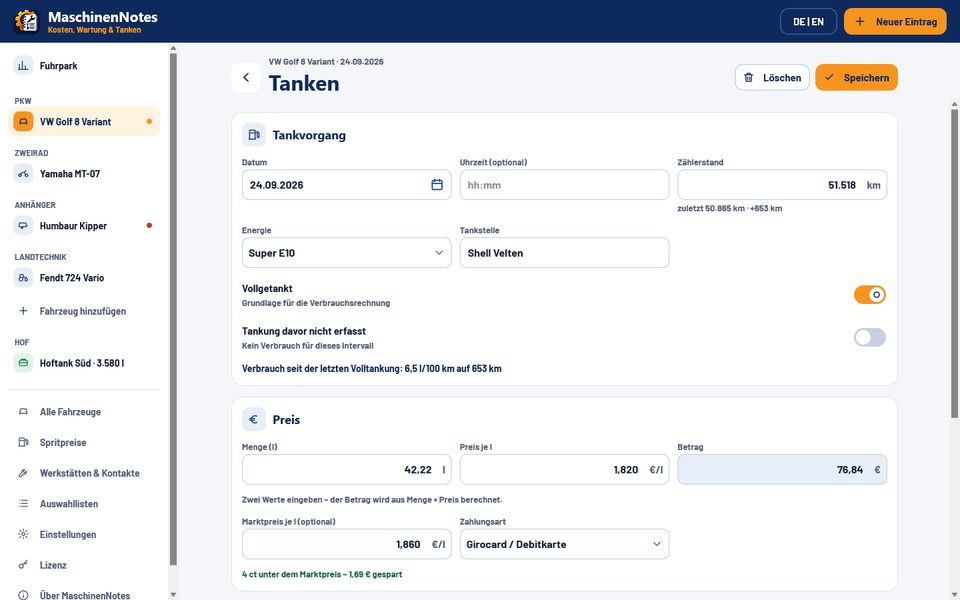
Every feature listed here is in the app today. The screenshots show sample data that you can switch on and off in the app.
Sync across all your devices
- Computer (Windows and Mac), phone and tablet share the same data
- Set up with the sync code from your license – your phone simply scans it as a QR code from the computer; unlimited phones and tablets, computers per license
- End-to-end encrypted with your sync code: the storage provider only sees encrypted data
- All devices are equal: even phone to phone, directly through the cloud – your computer doesn’t need to be running
- Work at the same time: changes are merged record by record, no conflict dialog
- Photos and receipts are synced too
- Storage: RuppiLab Cloud with no sign-up (included while your update rights run) or your own Google Drive, Dropbox or OneDrive (coming soon)
Vehicles & data
- 44 vehicle types in 7 groups: car, RV, motorcycle, scooter, moped, e-scooter, ATV, van, truck, bus, trailer, tractor, combine, forage harvester, telehandler, forklift, excavator, wheel loader, boats and more
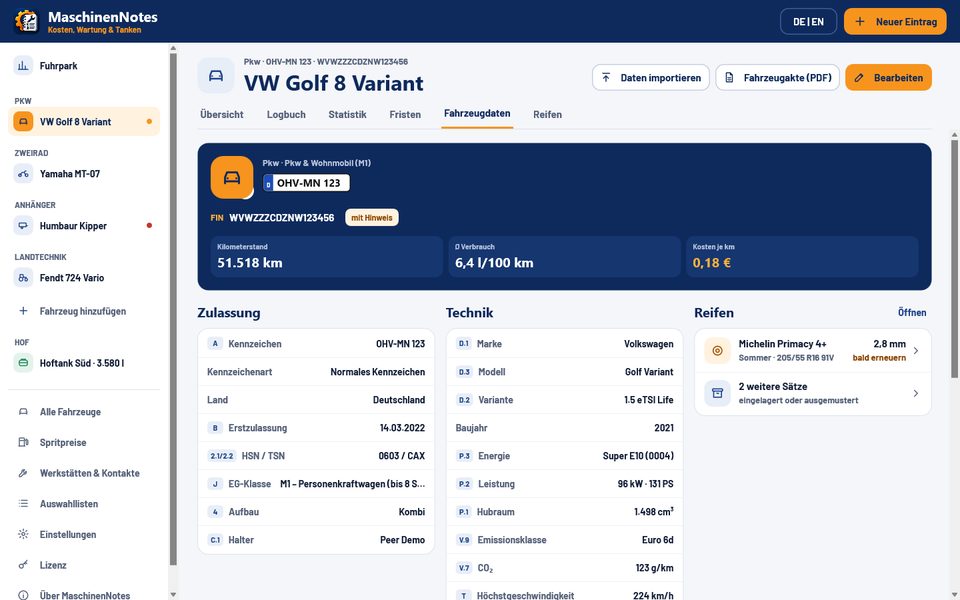
- VIN, PIN, serial number or HIN – VINs are checked, with hints when something looks off
- Vehicle details as on the German registration certificate (field codes A, B, D.1, D.3, P.1 …), plate type, EC vehicle category, emission class
- Vehicle photos with a cover image; receipts and documents as a photo or file on any entry
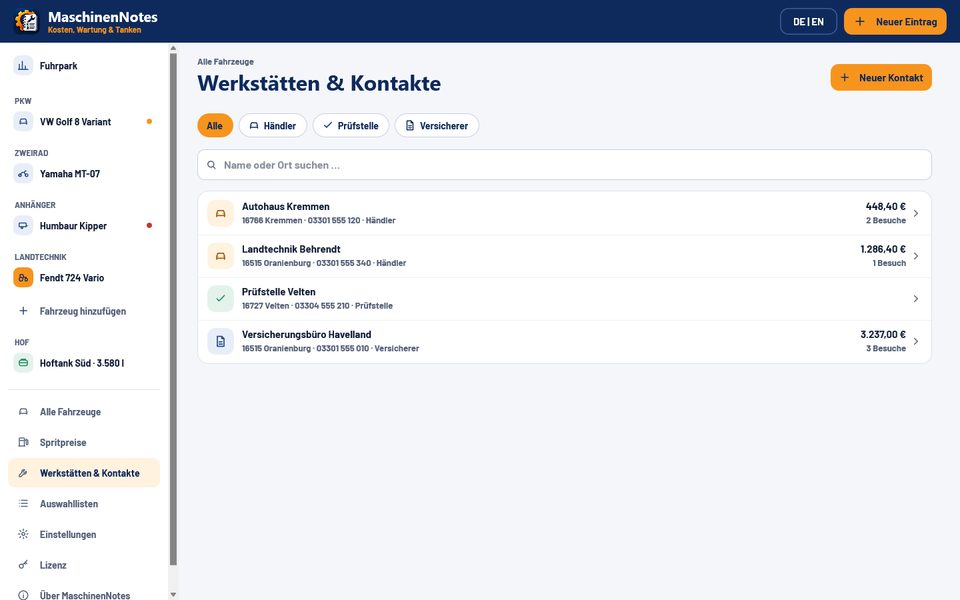
- Workshops and contacts – dealers, inspection stations, insurers – with call, route and costs per workshop
Logbook & fuel economy
- Fill-ups, EV charging (kWh), maintenance, costs, trips, tires, fluids, events and reminders in one logbook
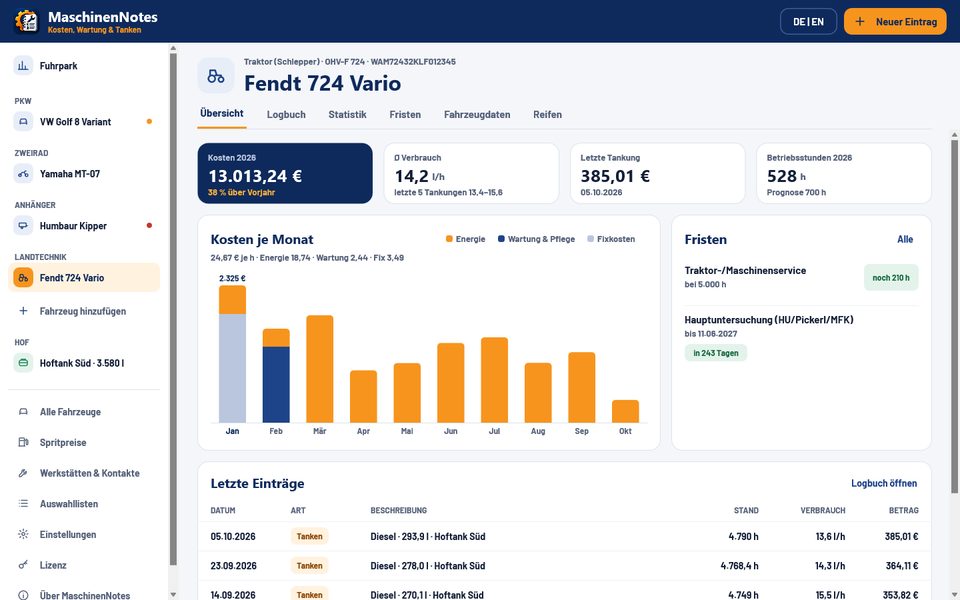
- Kilometers or engine hours per vehicle – consumption in l/100 km or l/h
- Consumption from full tank to full tank; partial and missed fill-ups are taken into account
- Comparison with the market price: “4 ct below market – €1.69 saved”
- Filters, monthly groups and totals with sum, average consumption and fuel volume
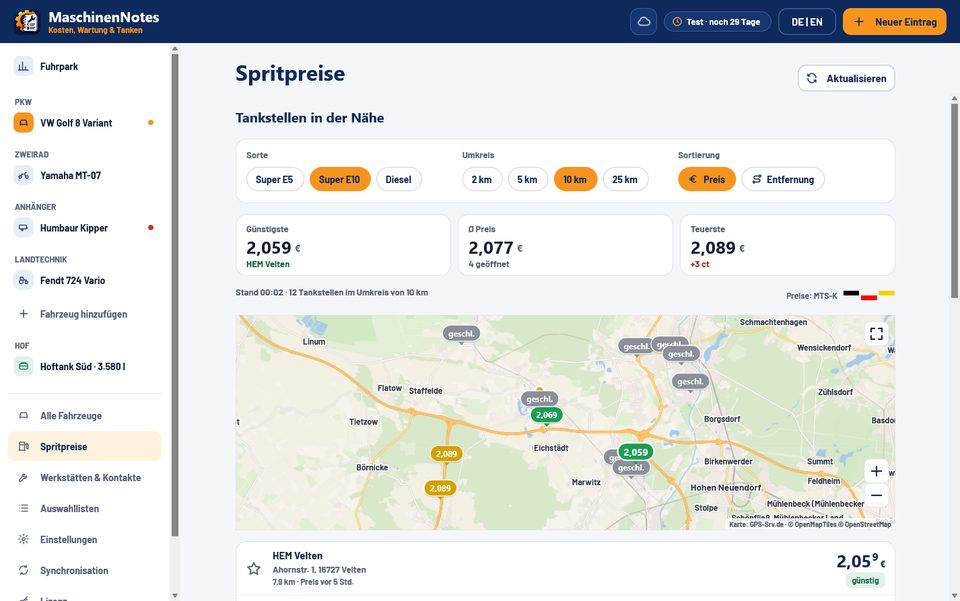
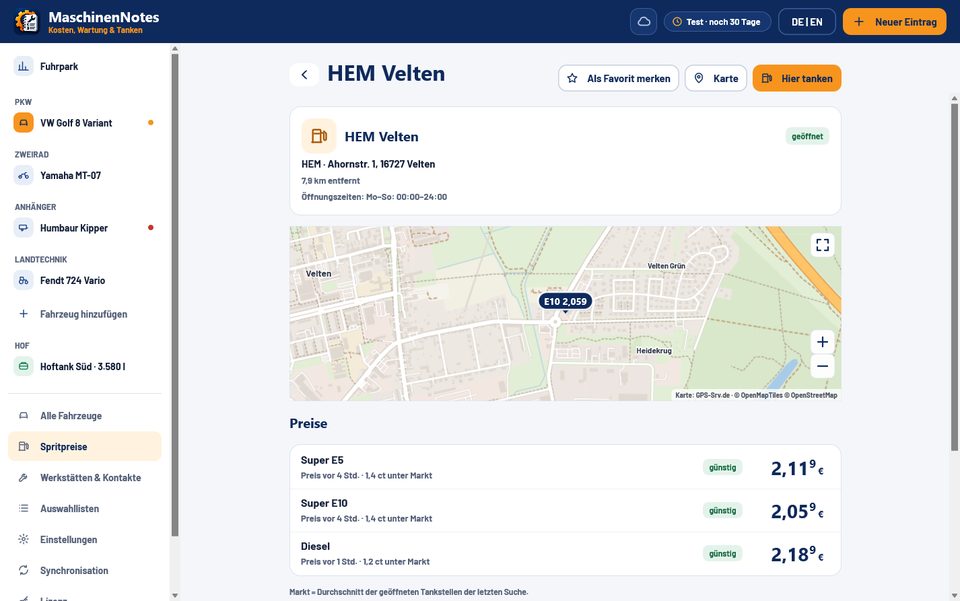
- Live fuel prices via the Tankstellen-Ampel.de API (data from the German Market Transparency Unit for Fuels, MTS-K): traffic light, opening hours, map with prices, favorites, price alerts and “report an error” to the MTS-K – no sign-up
Costs & statistics
- Costs per month, split into energy, maintenance and fixed costs
- Cost per kilometer or per engine hour, by category and per workshop
- Year-over-year comparison and a forecast for the current year
- Recurring costs such as insurance, tax or leasing are booked automatically
Deadlines & reminders
- Periodic inspections for Germany (HU/AU), Austria (§57a “Pickerl”) and Switzerland (MFK)
- Service by date, distance or engine hours
- 29 deadline templates: tire change, insurance cancellation, vehicle tax, fire extinguisher, first-aid kit …
- Suggestions based on vehicle type and country, notifications before things are due
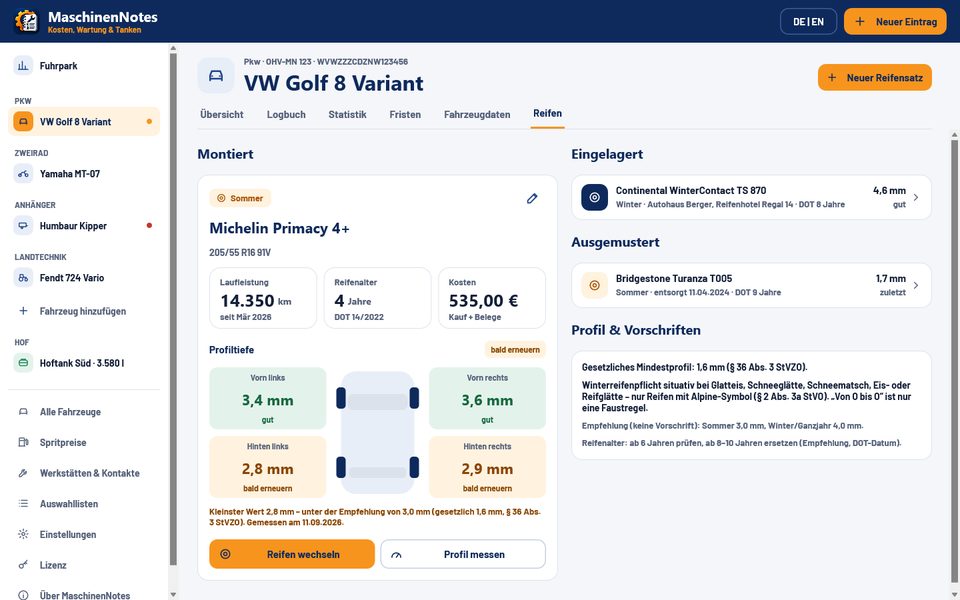
Tires
- Tire sets for summer, winter and all-season
- Tread depth per wheel, DOT age and mileage
- Storage (tire hotel) and tire changes
- Legal notes based on German regulations (§ 36 StVZO, § 2 (3a) StVO)
Farm tank & agricultural diesel
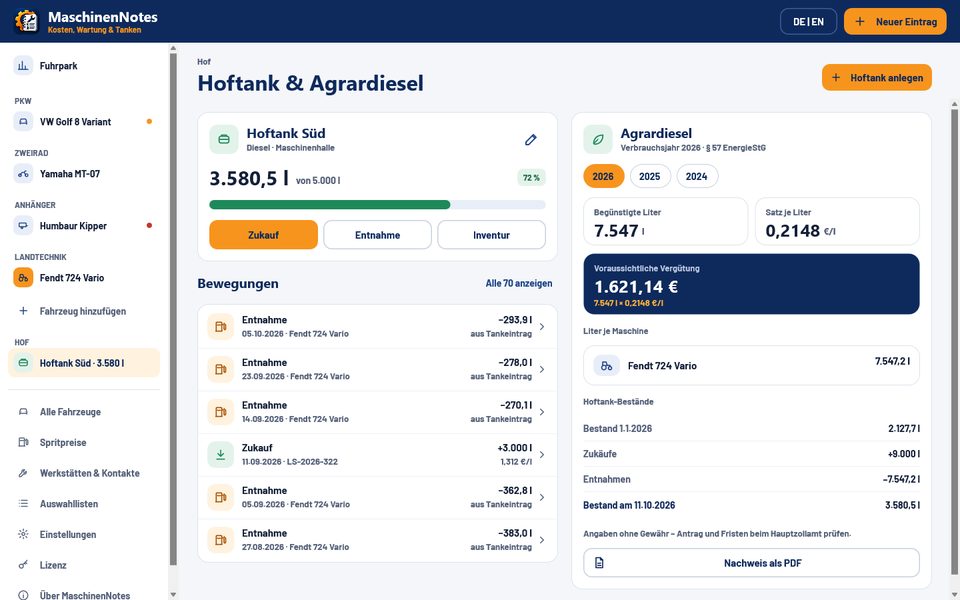
- Farm tank with stock level, purchases, withdrawals and stocktaking
- Withdrawals taken straight from the vehicles’ fill-up entries
- German agricultural diesel refund per year (§ 57 EnergieStG) with the rates that apply on each date
- Proof as PDF (no liability for accuracy)
Pick-list editor: set up everything your way
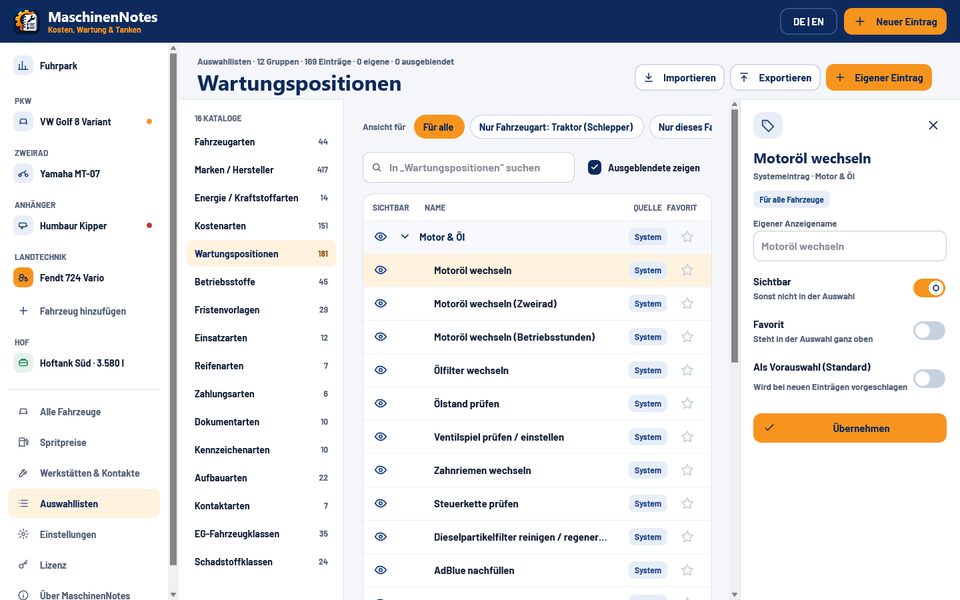
- 16 catalogs with more than 1,000 entries – including 417 brands, 181 maintenance items and 151 cost types
- Add your own entries, hide, rename, mark as favorite or preselect
- Valid for all vehicles, one vehicle type or a single vehicle
- Import and export lists
- Language, country, deadlines, counters and units per vehicle are all adjustable
Fleet
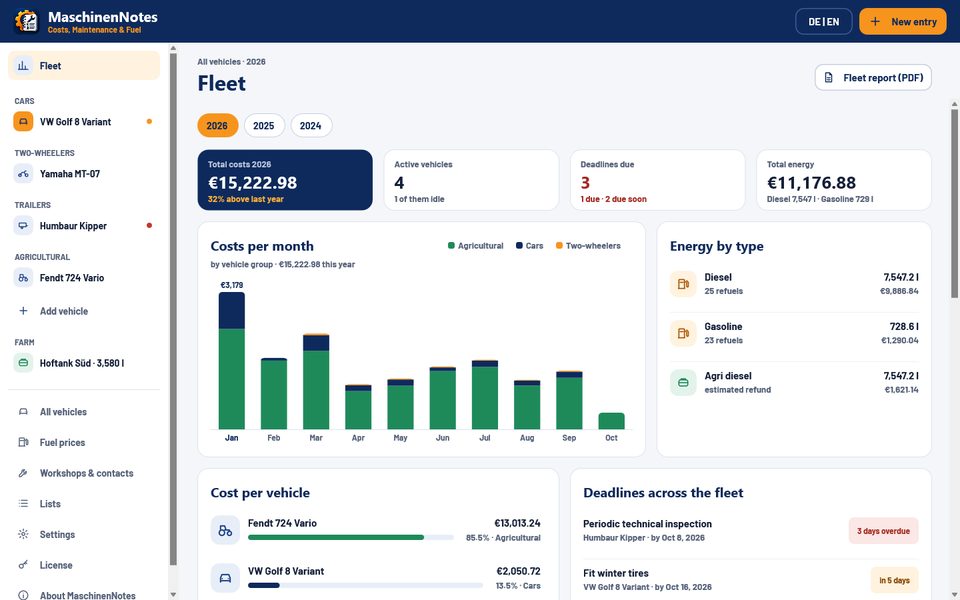
- Fleet overview from two vehicles: total costs and costs per month by vehicle group
- Energy by type and costs per vehicle side by side
- All deadlines across the fleet at a glance
- Fleet report as PDF
- For GPS-Srv customers: import trips, odometer readings and fuel stops from GPS-Srv.de automatically
PDF, CSV, import & backup
- PDF vehicle record with all data, costs, deadlines and the logbook
- Agricultural diesel proof and fleet report as PDF, CSV export
- CSV import from Spritmonitor, Drivenote, Fuelio and your own spreadsheets – with column mapping, preview, duplicate detection and undo
- Encrypted backup and restore, automatic backups
Privacy: local & encrypted
- Data is stored locally on each device – only what you sync goes to the cloud, and then end-to-end encrypted
- Database encrypted with AES-256
- No account, no tracking
- German and English, switchable at any time; countries Germany, Austria and Switzerland
Deliberately not included: No tax-compliant mileage log. No shared multi-user database on a network – sync keeps devices up to date instead of accessing one file at the same time. Sync is not available during the 14-day trial.
For GPS-Srv customers · no extra charge
Import trips from GPS-Srv
Already tracking your vehicles with GPS-Srv.de? Then trips, the odometer reading and, if you like, fuel stops land in the logbook automatically – no more typing.
Enter your key
Paste the API key from the GPS-Srv portal (Settings › API) into MaschinenNotes under Settings › Connections › GPS-Srv – for all devices or for a single vehicle.
Assign vehicles
Assign each GPS device to a vehicle. A match is suggested only for a unique VIN or license plate; nothing is created automatically.
It runs by itself
At startup, every 30 minutes and via “Fetch now” – without duplicates, even with several synced devices.

- Trips grouped per day or one by one – with start, destination, times and kilometers
- Odometer always up to date: mileage-based deadlines trigger on their own
- Fuel stops from GPS-Srv too, if you want them
- Route on RuppiLab’s own map (no Google Maps), if the key has the “Positions” permission
- Read-only access, key can be revoked in the portal at any time; trips in private mode come without locations


Not a tax-compliant mileage log: trips are logbook entries for costs, fuel economy and odometer readings. GPS-Srv provides kilometers, not engine hours.
See MaschinenNotes in action
Screenshots of the Windows version with sample data. Click to enlarge. Most show the German interface – the app switches to English with one click.
-
-

-
-
-
-
-
-
-
-
-
-
-
-
-
-
-
-


On your phone too – for free
The Android and iOS apps are coming to the stores soon: the same features, made for the phone, with no ads and no in-app purchases. Scan the QR code on your licensed computer or enter the sync code, and the app syncs everything, photos and receipts included – with other phones too, without your computer having to run. Without a code it works fully, just without sync.
Google PlayNot in the store yet App StoreNot in the store yet


Who is MaschinenNotes for?
Private owners
For your own car, RV or second car: what does the vehicle really cost, when is the next inspection due, which tires are in storage? Log fill-ups on your phone, analyze them at home on your computer.
Farms & contractors
Tractors, combines and telehandlers tracked by engine hours, the farm tank with stocktaking and the German agricultural diesel refund with PDF proof. Log on the phone in the tractor cab, analyze in the office.
Trades & fleets
Vans, trailers and company cars in one fleet overview – with costs per vehicle, every deadline and a fleet report as PDF. Every driver with their own phone, everything in sync at the office. With GPS-Srv, trips and odometer readings come in automatically.
Construction & machinery
Excavators, wheel loaders and forklifts with serial numbers and engine hours – service by the hour instead of by the calendar.
Classics, motorcycles & leisure
Seasonal vehicles, ATVs or boats (with HIN): a complete service history, receipts as photos and the vehicle record as PDF.
Desktop and mobile compared
| Feature | Windows & macOS | Android & iOS |
|---|---|---|
| Price | one-time license, free 14-day trial | free, no ads, no in-app purchases |
| Availability | download now | coming soon to the stores |
| Systems | Windows 10 and 11 (64- and 32-bit), macOS 12 or later (Apple silicon and Intel) | Android, iPhone and iPad |
| Features | all features | all features |
| Interface | large dashboard, sidebar with all vehicles, keyboard shortcuts (Ctrl+N, Ctrl+S, Ctrl+F, F1) | phone layout with bottom bar, photos and receipts straight from the camera |
| Sync between devices | with a license: sync with all your devices – end-to-end encrypted | via QR code or sync code from your computer – unlimited phones and tablets, even phone to phone without your computer running |
| Data | stored locally on the computer, AES-256 encrypted | stored locally on the phone, AES-256 encrypted |
Pricing & licenses
For Windows and macOS. All prices in euros, including 19% German VAT.
| License | Covers | Price |
|---|---|---|
| Single seat | One computer (Windows or Mac) – plus any number of phones and tablets via sync. Can be ordered several times, e.g. 3 single-seat licenses. | €49.00 per seat |
| Team | For one licensee – packs of 5 or 10 seats. Need more? Site license, or combine a team pack with single seats. |
|
| Site | All of the licensee’s computers at one location. | €499.00 |
| Update extension | 12 more months of updates for an existing license – the RuppiLab Cloud is extended too. | €19.00 per single seat Team and site: 40% of the package price |
Order a license
Fill in the form. You’ll get a confirmation email right away; the invoice and license key follow by email.
Manual
Everything explained step by step – from your first vehicle to the agricultural diesel proof.

Sample: vehicle record as PDF
This is the vehicle record MaschinenNotes creates for every vehicle – with sample data.
View sample (PDF, German)Frequently asked questions
How does the trial work?
After the first launch you can use MaschinenNotes with all features for 14 days – no sign-up, no payment details. The app shows how many days are left.
What happens after 14 days?
Without a license, MaschinenNotes switches to read-only mode: you can still see all data, statistics and photos, but you can’t make changes or export. As soon as you enter a license key, you pick up right where you left off.
How do I sync my phone and computer?
After purchase, unlock MaschinenNotes on your computer with your license key and set up sync under Sync. The desktop app then shows your sync code and a QR code. In the free phone app, go to More › Sync, tap “Scan QR code” and take a photo of the QR code on screen – or simply scan it with your regular camera app, and MaschinenNotes opens with the code filled in. Then just tap “Connect”. You can also type the code in; on another licensed computer, use “Enter existing code”. From then on all devices share the same data, photos and receipts included – and they also sync with each other when your computer is off. You can work on several devices at the same time: changes are merged record by record.
Where is my data stored – and who can read it?
On each device, in a database encrypted with AES-256. If you use sync, an end-to-end encrypted copy is also kept in the storage you choose: the RuppiLab Cloud or your own Google Drive, Dropbox or OneDrive. Google Drive, Dropbox and OneDrive are coming soon. Encryption happens on the device with your sync code – the storage provider, RuppiLab included, only sees encrypted data. There’s no account, and MaschinenNotes doesn’t collect usage data.
What happens to the RuppiLab Cloud after 12 months?
The RuppiLab Cloud is included for as long as your update rights run: 12 months from purchase, longer with each update extension, and permanently with lifetime update rights. After that, the RuppiLab Cloud stays readable for 90 days. You can then extend your update rights – or switch to your own Google Drive, Dropbox or OneDrive with one click, using the same sync code. Google Drive, Dropbox and OneDrive are coming soon. Sync itself remains part of your license.
Can I sync during the trial?
No. You get the sync code only after buying a license. During the 14-day trial, MaschinenNotes offers every other feature, but data stays on each device.
How many devices can I sync?
Unlimited phones and tablets. As many computers as your license has seats: one per single seat, the number of seats for a team license, unlimited for a site license.
Can I sync two phones with each other?
Yes. All devices are equal, there is no main device: two phones – or a phone and a tablet – sync directly through the cloud, even when your computer is switched off. You do have to set up sync once on a computer with a purchased desktop license, though: that is where the sync code is created, which you then add on each phone by QR code or by typing it. Without a desktop license there is no sync code – not even for two phones.
Can I use MaschinenNotes on several computers?
A single-seat license covers one computer. For more computers, order several single seats, a team or a site license. There’s no online activation and nothing is tied to your hardware. With sync, all licensed computers share the same data – but it isn’t a shared network database that everyone accesses at the same time.
Does it run on a Mac?
Yes, from macOS 12 – on Macs with Apple silicon and on Intel Macs (one universal app). Choose the disk image (.dmg, drag the app to Applications) or the installer package (.pkg). Your license key works on both Windows and Mac.
How long do I get updates?
12 months from purchase are included. After that your version keeps working indefinitely; if you want newer versions, extend your update rights by 12 months at a time.
Can I import data from other apps?
Yes, via CSV from Spritmonitor, Drivenote, Fuelio or your own spreadsheet. You map the columns, see a preview, duplicates are detected – and every import can be undone.
Where do the fuel prices come from?
Live from the Tankstellen-Ampel.de API, based on data from the German Market Transparency Unit for Fuels (MTS-K) – Germany only, no sign-up and no key of your own. You see nearby stations with a traffic light (green, yellow, red), opening hours and a map, can save favorites, set a price alert and report wrong data straight to the Market Transparency Unit. The map comes from RuppiLab’s own map server – no Google Maps.
When will the Android and iOS apps be available?
Soon. They will be free – no ads and no in-app purchases. With the sync code from your desktop license, they sync with your computer. Once they’re in the stores, you’ll find the links on this page.
Is MaschinenNotes a tax-compliant mileage log?
No. A tax-compliant electronic mileage log is deliberately not included. You can record trips in the logbook, but not as proof for tax purposes. The same goes for trips from GPS-Srv.
I use GPS-Srv – does this work automatically?
Yes, at no extra charge. Enter the API key from the GPS-Srv portal (Settings › API) in MaschinenNotes under Settings › Connections › GPS-Srv – an account key for all devices or a device key for one vehicle – and assign each device to a vehicle. MaschinenNotes then fetches trips (grouped per day or one by one), the odometer reading and, optionally, fuel stops at startup, every 30 minutes and via “Fetch now” – without duplicates. Mileage-based deadlines then trigger on their own. Access is read-only, and you can revoke the key in the portal at any time. It is not a tax-compliant mileage log, and GPS-Srv currently provides kilometers only, no engine hours.